Apple Name Frame Back to School
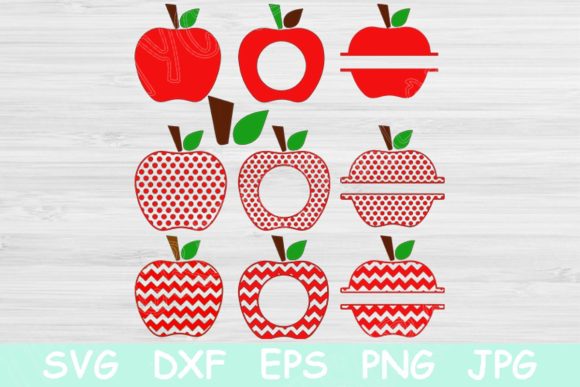
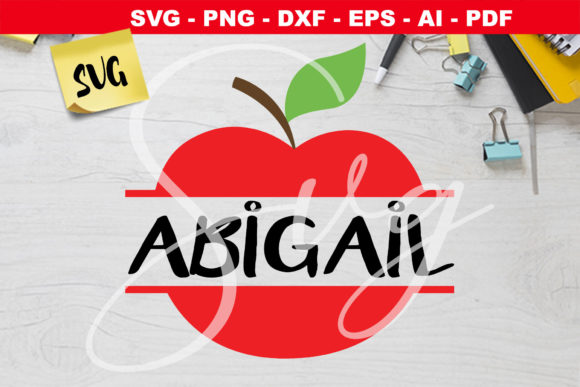
If you have ever spent an afternoon hunting for a custom label, classroom tag, or personalized gift that actually looks polished, you already know the frustration. Most templates feel generic, and store-bought options rarely match what you picture in your head. That is exactly where the Apple Name Frame Back to School design steps in. It gives you a clean, recognizable apple motif combined with room for a name or short message, all delivered in a format package that actually respects how different people work.
What makes this design different from a typical template
At first glance, it is an apple graphic with a frame. But the real value is not in the shape itself. It is in how the file set is built. You receive the design in SVG, AI, PDF, EPS, DXF, and PNG formats. That list is not just a bullet point for show. Each format serves a specific purpose, and together they mean you are not locked into one piece of software, one machine, or one use case.
The SVG and EPS files are vector-based, so you can scale the apple frame from a tiny sticker to a poster-sized print without losing sharpness. The AI file opens natively in Adobe Illustrator if that is your workspace of choice. The DXF version is engineered for cutting machines like Cricut or Silhouette, which matters if you plan to cut the design out of vinyl, cardstock, or heat transfer material. The PDF gives you a reliable print-ready version that any computer can open. And the PNG works for quick digital use when you do not want to fuss with vectors.
That range alone makes this product more practical than most single-format downloads. You are essentially getting one design file that has been adapted for seven different workflows.
Where this design fits into real routines
The Apple Name Frame Back to School design is versatile enough to move between personal projects and professional tasks. Here is a breakdown of the environments where it tends to be most useful.
Classroom and educational settings
Teachers and educators are often the first people who recognize the value of a good name frame. Whether you run a preschool classroom or teach upper elementary grades, having a consistent visual for name tags, cubby labels, desk plates, and locker signs creates a sense of order. The apple shape is widely associated with education, so it feels intentional rather than random.
You can print the PDF version on cardstock, cut the DXF version with a die-cutting machine, or even use the PNG to drop into a classroom newsletter or digital seating chart. The name area inside the frame gives enough room for a first name, last initial, or a short word like Welcome or Read.
Personalized gifts and back-to-school surprises
Parents and family members often look for small ways to mark the start of a school year. A personalized water bottle, notebook cover, or pencil pouch with a child's name inside an apple frame makes a thoughtful gift without being over-the-top. Because the design comes in heat-transfer-compatible formats, you can press it onto fabric items like tote bags, lunch sacks, or even hoodies.
The PNG format lets you drop the design into a card template or photo collage. You can pair it with a first-day-of-school picture and the child's name for a social media post that feels custom without requiring design skills.
Small business and creator use
If you run a small shop on Etsy, Amazon Handmade, or your own website, this design can save you hours of production time. You can use the vector files to create physical products like wooden signs, acrylic keychains, or laser-engraved items. The DXF version loads directly into cutting machine software, and the EPS file works with most laser engraving programs.
Because the Apple Name Frame Back to School design is delivered as a digital download, you can produce items on demand without holding inventory. You personalize the name, produce the item, and ship it. That workflow keeps overhead low and turnaround fast.
Digital content and marketing
Bloggers, newsletter writers, and social media managers can use the PNG version as a graphic element in posts, thumbnails, or email headers. The transparent background makes it easy to layer over photos or colored backgrounds. If you are creating a back-to-school resource guide, a printable checklist, or a series of Instagram stories, the apple name frame adds a cohesive visual anchor.
You can also resize the SVG file in a browser-based editor like Canva or Vectr without needing expensive software. That means even if you are not a designer, you can adapt the frame to fit your brand colors and fonts.
Usability and efficiency benefits worth noting
The biggest frustration with many digital products is the gap between what you buy and what you can actually do with it. That gap usually shows up when the file format does not match your equipment. By offering SVG, AI, PDF, EPS, DXF, and PNG, this design removes that friction. You do not need to convert files, hunt for a specific program, or settle for a lower-quality version.
Another practical benefit is the vector nature of the main files. Raster images like JPEGs lose quality when you enlarge them. Vector files keep their crisp edges at any size. That matters if you want to print a small sticker for a notebook and also produce a large wall decal for a classroom door. One file handles both tasks.
The instant download aspect also speeds up your workflow. There is no shipping wait, no inventory management, and no per-item production delay. You purchase once and then produce as many copies as you need, for as many names or uses as you require.
Realistic examples of how people use this
Let me walk you through a few scenarios that show the range of this product.
A freelance graphic designer receives a rush order from a local school district. They need 200 desk nameplates with a consistent apple theme. The designer opens the AI file, sets up a data merge with student names, and generates the entire batch in under an hour. The printer receives vector PDFs that output cleanly at full size.
A parent who runs a Cricut machine at home wants to make customized water bottles for a kindergarten class. They open the DXF file, resize it to fit a standard 16-ounce stainless steel bottle, and cut permanent vinyl in two colors. The apple frame goes on the front, and each child's name sits inside the frame. The whole project takes an afternoon and costs a fraction of what store-bought personalized bottles would run.
A lifestyle blogger creates a free printable for her audience. She uses the PNG version with a transparent background, places it in a letter-sized document, and adds a line for a child's name underneath. Her readers can download the PDF, type in a name, and print at home. The consistent branding keeps her content recognizable.
What to consider before using this design
The Apple Name Frame Back to School product is a digital asset, not a physical item. Make sure your software and machine accept the formats listed. SVG and DXF work on most cutting machines, but some older models may require a specific import process. AI files open natively in Adobe Illustrator, but if you use Affinity Designer or Inkscape, you can typically import the SVG or EPS versions without issue.
If you plan to sell finished products made from this design, check the license terms included with your purchase. Some digital products allow commercial use with limits, while others restrict production quantities or require attribution. Knowing the terms upfront prevents problems later.
Color customization is straightforward in vector editors. You can change the apple outline, the frame border, or the background fill to match a school color, brand palette, or personal preference. The PNG version is pre-rendered, so edits to that file are more limited, but you have full control over the vector formats.
Why this format list matters more than you might think
Many digital products claim to be multi-format, but the reality is sometimes disappointing. A file labeled SVG might not actually contain vector paths. A DXF might be scaled incorrectly. With this design, the formats are functional and tested. The SVG scales cleanly in browsers and design apps. The DXF opens correctly in cutting machine software. The PNG holds transparency and works for quick digital placement.
That reliability is the difference between a file that saves you time and one that costs you time. When you are working against a deadline, you do not want to troubleshoot a broken file. You want to open it, adjust it, and move on.
If you have ever downloaded a template only to find out it does not work with your machine, you already understand why format compatibility is a practical concern, not a technical footnote.
Final observations on practical use
This design works best when you treat it as a starting point, not a finished product. The apple frame is clean and recognizable, but the real value comes from how you personalize it. Add a name. Change the color. Scale it for a specific project. Pair it with other graphics or text. Because the files are editable and scalable, you are not stuck with someone else's idea of what looks good.
Whether you are a teacher preparing a classroom, a parent making back-to-school gear, a business owner producing inventory, or a creator building content, the format variety and vector quality give you room to work the way you prefer. You are not required to learn new software or adapt your workflow to the file. The file adapts to you.
That flexibility is what separates a useful digital product from one that sits unused in a downloads folder. And with the range of applications covered here, the Apple Name Frame Back to School design earns its place in that first category.