Zooming Back to School Bundle: A Practical Asset Library for Creative Projects
The transition back to school is a busy season for educators, small business owners, content creators, and anyone involved in preparing learning materials, decorations, or promotional items. Whether you design custom t-shirts for school events, create classroom decor, or produce digital resources for students, having a reliable set of graphic assets can streamline your workflow significantly. The Zooming Back to School Bundle provides a focused collection of illustrations tailored for this specific season. Instead of searching for individual elements or creating them from scratch, this bundle offers a cohesive set of files that can be used across multiple applications and platforms.
This article explores how the bundle fits into real-world workflows, from planning and preparation to execution and archiving. We will look at practical ways to integrate these assets into your projects, ensure compatibility with your tools, and maximize the value of the files over time. The focus is on process, efficiency, and consistency, helping you move from idea to finished product without unnecessary friction.
What the Zooming Back to School Bundle Actually Contains
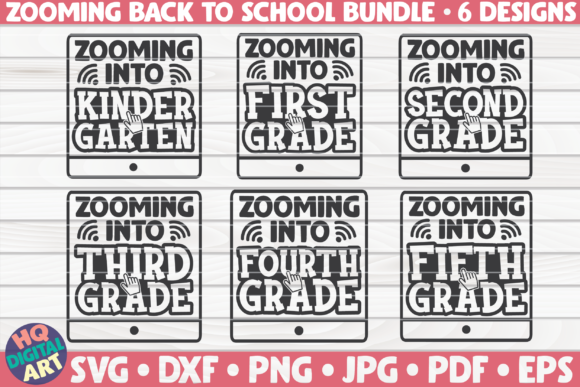
The bundle consists of six distinct illustrations, each delivered in six common file formats. When you place an order, you receive archived files with the following structure:
- 6 DXF files – Ideal for cutting machines like Cricut and Silhouette Cameo, especially when using the basic Design Space or Silhouette Studio editions that accept DXF.
- 6 PDF files – Useful for printing, sharing, or embedding in documents. PDFs preserve vector quality and can be opened on virtually any device.
- 6 SVG files – The standard for scalable vector graphics, widely supported in design software such as Inkscape, Adobe Illustrator, and Corel Draw.
- 6 PNG files at 300 ppi with transparent backgrounds – Ready for web use, digital presentations, or quick print layouts where a raster image with transparency is needed.
- 6 JPG files – High-quality raster images suitable for email attachments, social media, or any situation where a smaller file size and universal compatibility are important.
- 6 EPS files – Legacy vector format that works with many professional design applications and can be imported into various workflows.
This combination means you receive the same artwork in both vector and raster forms, giving you flexibility depending on your output medium. The illustrations themselves are described as being of much higher quality than the preview images, so you can expect clean lines, sharp details, and well-defined shapes suitable for both print and cut applications.
Pre-Project Preparation: Setting Up for Smooth Integration
Before diving into a project, a few preparatory steps can save time and prevent compatibility headaches. The bundle files come archived, so the first step is to unzip them into a dedicated folder. Organize the subfolders by file type or by illustration name, depending on how you plan to access them. For example, you might create folders named “SVG,” “PNG,” “EPS,” and within each, have the six corresponding files labeled clearly.
Check the system requirements of your design software. The bundle is compatible with Design Space (Cricut), Silhouette Studio Designer Edition or higher (for SVG and DXF), Inkscape, Corel Draw, Adobe Illustrator, Sure Cuts A Lot (SCAL), and similar programs. If you are using a free or basic version of Silhouette Studio, note that SVG import may require the Designer Edition upgrade, but DXF files often work in the basic version. Similarly, Cricut Design Space accepts both SVG and DXF, but DXF sometimes imports more reliably depending on the complexity of the design. Testing one file from each format before starting a large project helps you identify which workflow works best for your tools.
For those using raster images, the 300 ppi PNG files with transparent backgrounds are pre-optimized. You can drag them directly into a document or layer them without needing to remove backgrounds manually. The JPG files are suitable for mockups or quick previews but lack transparency. Keep this in mind when deciding which format to use for a given task.
During the Project: Integrating Files into Design Software and Cutting Machines
The real value of the Zooming Back to School Bundle becomes apparent in the execution phase. Suppose you are designing a set of classroom labels. You can open the SVG file in Inkscape or Adobe Illustrator, scale the illustration to your desired size, and combine it with text or other elements. Because the vector paths are clean, you can change colors, apply effects, or weld letters together without degrading quality. Export the final design as a new SVG or DXF for your cutting machine.
For a small business making custom apparel, the EPS or SVG format works well in professional vector software. You can use the illustrations as part of a layered heat transfer design. Import the EPS into Illustrator, separate elements if needed, and assign cut lines. The PNG version serves as a quick reference or can be used for sublimation printing if your printer handles raster images.
If you are an educator preparing digital resources, the PNG files with transparent backgrounds are immediately usable in PowerPoint, Google Slides, or Keynote. Drop them onto a slide and they blend seamlessly with the background. You can also embed them in PDF worksheets using the included PDF files themselves, which already have crisp vector quality. No additional compression or resizing is necessary for standard print resolutions.
When working with Cricut Design Space, import the SVG file directly. The system will recognize the paths and allow you to assign cut and score lines. Because the illustrations are designed for cutting, expect each element to be on a single layer or grouped logically. If you need to separate parts (for example, to cut different colors), use the “Ungroup” or “Contour” functions. The DXF format can serve as an alternative if SVG import behaves unexpectedly.
Post-Project: Archiving and Repurposing Assets
After completing a project, the bundle files remain valuable for future use. Since you own the illustrations, you can repurpose them across different contexts. For instance, a back-to-school design used for a t-shirt this year might be reused for a banner next year, with different colors or sizing. Keep the original files intact in a well-organized archive. If you modify an illustration (e.g., change a color, combine with other designs), save the derivative file separately so you can always return to the clean original.
The multiple file formats also enable cross-platform collaboration. You might send the EPS to a commercial printer, the SVG to a colleague using open-source software, and the PNG to a client for approval. Having these formats ready means you don’t need to convert files back and forth, which can introduce errors or quality loss. For long-term storage, vector formats (SVG, EPS, DXF) are recommended because they scale infinitely and remain editable.
Interacting with Other Tools, Methods, and Decisions
The bundle does not exist in isolation; it integrates with broader creative processes. For example, if you use a digital asset management system, you can tag each file with keywords like “back to school,” “bus,” “apple,” “pencil,” etc., for quick retrieval. The transparency of the PNG files means they can be stacked with other graphics in a compositing tool like Canva or Photoshop. The JPG files are lightweight enough to include in email newsletters without bloating the message size.
For those who plan their projects using mood boards or style guides, the bundle provides a consistent visual language. Because all six illustrations share a unified aesthetic, you can mix them in a single project without clashing. This consistency is especially useful when creating a series of materials—such as a set of bulletin board cutouts, classroom signs, and reward stickers—where cohesion matters.
If you sell digital products, the files themselves can become part of a larger product offering. For instance, you might combine the PNG graphics with a digital planner template or incorporate the vectors into a printable worksheet set. The bundle gives you a starting point that reduces the design time required to create such products.
Quality Control and Long-Term Usability
According to the product description, the illustrations you receive are of much higher quality than the preview images. This is an important point for creative professionals who rely on precise outlines and sharp edges. When you open a DXF or SVG file in your software, zoom in to check for stray nodes or overlapping paths. If everything is clean, you can proceed with confidence. If you encounter any issues, vector editing tools allow you to fix minor imperfections, though this should be rare with professionally made files.
For cutting projects, test the file on a small piece of material before committing to expensive vinyl or cardstock. Adjust the cut settings based on the material type. Because the files are vector based, you can scale them up or down without losing resolution, but always consider the physical limitations of your cutting machine—very small details may not cut cleanly on certain substrates.
The 300 ppi PNG files are print-ready for most home and small office printers. For larger commercial prints, the vector formats are superior. Keep in mind that JPG files use lossy compression, so if you plan to edit a raster version repeatedly, start with the PNG to avoid generation loss.
Practical Implementation Tips
- Organize by project type: Create separate folders for “cut,” “print,” and “digital” to quickly access the most appropriate format.
- Name files consistently: Rename the illustrations with descriptive names (e.g., “school_bus.svg”) so you can find them later without opening each one.
- Test compatibility early: Before starting a batch of projects, import one SVG and one DXF into your primary software to verify that paths and layers behave as expected.
- Use the EPS as a master: Since EPS is a widely supported vector format, consider keeping one set of EPS files as your untouched originals, and modify copies in other formats.
- Backup the archive: Store the original zip file in a cloud service or external drive. If you accidentally overwrite a file, you can always extract a fresh copy.
- Leverage transparency: The PNG files with transparent backgrounds are perfect for quick compositing. Drop them into a design tool without needing to erase backgrounds.
- Scale with care: When scaling vectors, maintain proportions to avoid distortion. In most software, holding the Shift key while dragging corners preserves the aspect ratio.
Conclusion: A Workflow-Ready Asset Bundle
The Zooming Back to School Bundle is more than a collection of cute illustrations; it is a practical toolset designed for integration into real production pipelines. By offering six file formats for each design, it removes the friction of format conversion and ensures that you have the right asset whether you are cutting vinyl, printing a poster, or sharing a digital graphic. The key to getting the most out of the bundle lies in preparation—organizing files, testing compatibility, and understanding the strengths of each format. When these steps are followed, the bundle becomes a time-saving resource that supports consistent, high-quality output across multiple projects. Whether you are a teacher sprucing up a classroom, a small business owner creating seasonal merchandise, or a content producer developing educational materials, these assets can fit smoothly into your existing workflow and help you deliver results efficiently.